Blog
AI Agents for Small Business: A Practical Guide to Getting Started
How small businesses can use AI agents to automate operations without enterprise budgets. Real examples, real costs, real setup steps.
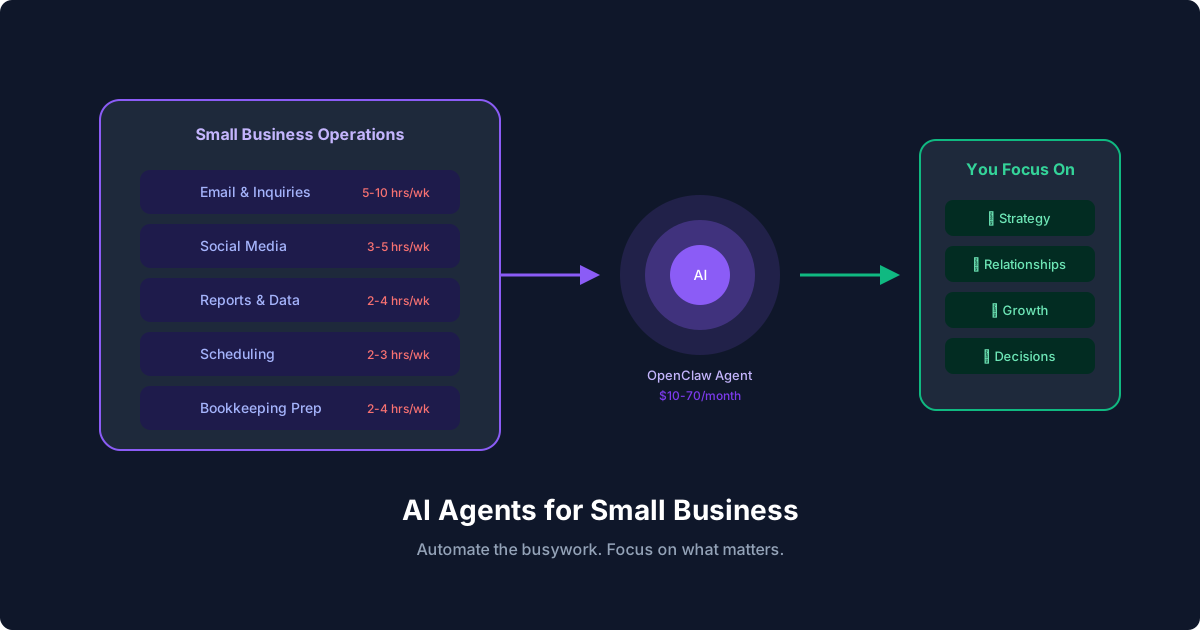
AI Agents for Small Business: A Practical Guide to Getting Started
Enterprise companies have teams of engineers building custom AI solutions. Small businesses have a founder wearing six hats and maybe one part-time VA. The good news: AI agents have gotten good enough and cheap enough that a solo operator or small team can automate meaningful chunks of their operations without an enterprise budget or a CS degree.
This guide is specifically for small business owners and operators who want practical results, not buzzword bingo.
What AI Agents Actually Do for Small Businesses
Forget the science fiction framing. An AI agent for small business is software that handles routine tasks on your behalf. It reads your emails, answers customer questions, generates reports, posts social updates, monitors your calendar, and flags what needs your personal attention.
The difference between an AI agent and a simple chatbot: agents take action. A chatbot answers questions. An agent reads your inbox, drafts a response, checks your calendar for conflicts, and schedules a meeting. All without you touching it.
Real examples from small business operations:
- A freelance consultant's agent monitors their inbox, categorizes inquiries by project type, drafts initial responses, and adds qualified leads to their CRM
- An e-commerce store owner's agent tracks competitor pricing daily, generates social media post drafts, and summarizes daily sales data every morning
- A property manager's agent triages maintenance requests from tenants, creates work orders, and schedules contractor visits based on urgency and availability
How Much Does This Actually Cost?
Small businesses care about costs. Here's an honest breakdown:
Infrastructure (hosting your AI agent):
- Budget VPS: $5 to $20/month (DigitalOcean, Hetzner, Linode)
- Or run it on hardware you already have
AI model API costs:
- Light usage (email triage, daily reports): $5 to $15/month
- Moderate usage (customer support, content drafts): $20 to $50/month
- Heavy usage (constant monitoring, high-volume processing): $50 to $100/month
Software:
- OpenClaw: Free (open source)
- Skills and integrations: Free (community-maintained)
Total realistic cost: $10 to $70/month for most small businesses. Compare that to a part-time VA at $500 to $1,500/month or a SaaS automation platform at $50 to $300/month.
The 5 Best AI Agent Use Cases for Small Business
1. Customer Inquiry Response (Saves 5 to 10 hours/week)
Most small businesses get the same 20 questions repeatedly. An AI agent can handle these instantly while routing anything complex to you.
Set it up in OpenClaw:
# AGENTS.md - Customer Support Agent

## Job
- Monitor support inbox every 15 minutes
- Answer questions covered in the knowledge base
- Draft responses for questions that need my review
- Forward urgent issues to my phone immediately

## Knowledge Base
- Pricing: (your pricing details)
- Hours: Monday-Friday, 9-5 CT
- Return policy: 30 days, original packaging required
- Shipping: 3-5 business days domestic, 7-14 international

## Escalation
- Complaints: always forward to me
- Refund requests over $100: need my approval
- Technical issues: forward to tech support email
2. Social Media Management (Saves 3 to 5 hours/week)
Writing, scheduling, and monitoring social media is a time sink. An AI agent can draft posts based on your content calendar, monitor mentions and comments, and compile engagement reports.
# HEARTBEAT.md - Social Media Checks
- Check brand mentions on Twitter/X and LinkedIn
- Draft 2-3 social posts from this week's blog content
- Compile engagement stats from yesterday's posts
- Flag any negative mentions for immediate review
3. Bookkeeping Prep (Saves 2 to 4 hours/week)
Your agent won't replace your accountant, but it can do the prep work: categorizing transactions, matching receipts to expenses, flagging unusual charges, and preparing weekly summaries for your bookkeeper.
4. Meeting Scheduling and Follow-Up (Saves 2 to 3 hours/week)
Beyond basic calendar management, AI agents can research meeting attendees, prepare relevant context from past interactions, draft agendas, and send follow-up summaries with action items after meetings end.
5. Daily Operations Digest (Saves 1 to 2 hours/week)
Start every morning with a briefing: yesterday's sales, open support tickets, upcoming meetings, social media highlights, and anything that needs immediate attention. Your agent compiles this while you sleep.
# Cron job: daily briefing at 7 AM
schedule: "0 7 * * *"
task: |
  Compile daily briefing:
  - Yesterday's revenue from Stripe
  - Open support tickets (count + urgent ones)
  - Today's calendar events
  - Social media engagement summary
  - Any emails flagged as urgent overnight
  Deliver to Telegram.
Getting Started: Step-by-Step Setup
Step 1: Pick Your First Automation
Don't try to automate everything at once. Pick the task that eats the most time every single day. For most small businesses, that's email or customer inquiries.
Step 2: Install OpenClaw
npm install -g openclaw
openclaw init
This creates your workspace with the configuration files you'll need. Full installation docs are at docs.openclaw.ai.
Step 3: Write Your Agent's Instructions
Open AGENTS.md and describe what your agent should do. Write it like you're training a new employee: clear responsibilities, decision criteria, and escalation rules.
# AGENTS.md

## Role
Virtual operations assistant for [Your Business Name]

## Daily Tasks
1. Check inbox at 8am, 12pm, and 5pm
2. Respond to routine inquiries using knowledge base
3. Draft replies for anything requiring my input
4. Send me a summary at 6pm with everything handled

## Rules
- Never commit to pricing not listed in our rate card
- Always be professional but warm
- When unsure, ask me rather than guessing
- Never share customer data externally
Step 4: Add Your Business Knowledge
Create a MEMORY.md file with the information your agent needs:
# MEMORY.md

## Business Info
- Company: [Your Business]
- Industry: [Your Industry]
- Primary products/services: [List them]
- Pricing: [Rate card or link]

## Key Contacts
- Accountant: Jane at jane@accounting.com
- Supplier: Bob at bob@supplier.com
- Biggest client: Acme Corp, contact Sarah

## Common Customer Questions
- [Question 1]: [Answer]
- [Question 2]: [Answer]
- [Question 3]: [Answer]
Step 5: Connect Your Tools
Install skills for the tools you use. OpenClaw has skills for Gmail, Slack, Telegram, calendar, and more:
# Browse available skills
clawhub search gmail
clawhub install gog  # Google Workspace integration
Step 6: Test Manually, Then Automate
Run your agent manually for a week. Review every decision it makes. Correct mistakes by updating the AGENTS.md and MEMORY.md files. Once you're confident in its judgment, enable automated scheduling through heartbeats or cron jobs.
Avoiding Common Pitfalls
Don't let the agent speak for you to high-value clients. Use it to draft responses, but review before sending anything to your top accounts. Set clear escalation rules.
Start with internal automation before customer-facing. Get comfortable with report generation and data processing before letting the agent respond to customers directly.
Review the agent's work daily for the first month. It's like training a new hire. You wouldn't hand someone the keys on day one. Spot-check consistently, provide corrections, and build trust gradually.
Keep your knowledge base current. An agent with outdated pricing or discontinued product information will cause real problems. Build a habit of updating MEMORY.md when business details change.
Set spending limits. If your agent makes API calls or processes transactions, set explicit caps. Define what amount requires your approval versus what it can handle autonomously.
Scaling Up: What Comes After Your First Agent
Once your first automation is running smoothly, you can expand in stages:
1. Month 1: Email triage and response
2. Month 2: Add daily operations digest
3. Month 3: Social media monitoring and draft posting
4. Month 4: Meeting prep and follow-up automation
5. Month 5: Bookkeeping prep and expense categorization
Each new automation should follow the same pattern: define the process, configure the agent, test manually, then automate. By month 6, you'll have a virtual operations team running on $50/month instead of $5,000.
Resources
- OpenClaw Documentation: Full setup guides and reference
- OpenClaw GitHub: Source code and community
- How to Build an AI Agent Workflow: Technical walkthrough
- 5 OpenClaw Automations That Save 10+ Hours a Week: Practical examples
- Best AI Workflow Automation Tools: Tool comparison